















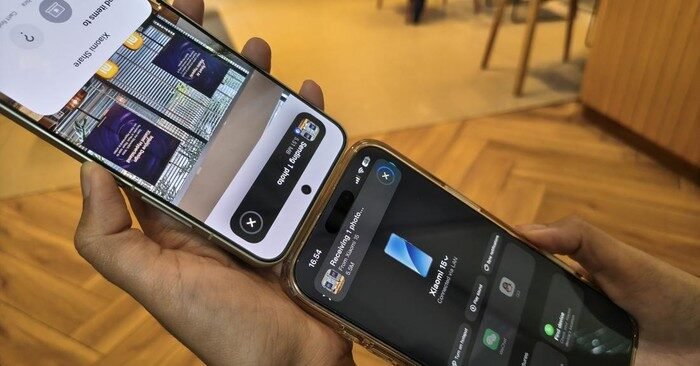
Want to transfer photos from Xiaomi to iPhone wirelessly? With Xiaomi HyperOS 3, this is now easier than ever. The built-in Xiaomi Interconnectivity feature lets you transfer photos from Xiaomi to iPhone — no cables, no compression, no third-party apps needed.
This cross-platform file sharing works similarly to Apple’s AirDrop, but bridges the gap between Android and iOS ecosystems seamlessly. In this guide, you’ll learn exactly how to transfer photos from Xiaomi to iPhone using HyperOS 3 step by step.
What Is Xiaomi Interconnectivity in HyperOS 3?
Xiaomi Interconnectivity is a native feature built into Xiaomi HyperOS 3 that allows wireless file transfers between Xiaomi devices and iPhones (or iPads). It uses a combination of Wi-Fi and NFC to establish a fast, secure connection between the two devices — no USB cable or third-party app required on the Xiaomi side.
Before HyperOS 3, transferring files from Xiaomi to iPhone required USB cables or messaging apps that compressed photo and video quality. Now, the Xiaomi Interconnectivity feature solves this completely with full original quality preservation. You can learn more about the feature on the official Xiaomi website.
Requirements: What You Need to Transfer Photos from Xiaomi to iPhone
Before you transfer photos from Xiaomi to iPhone wirelessly, make sure all of the following conditions are met:
- Your Xiaomi phone is running HyperOS 3 or later
- Your iPhone has the Xiaomi Interconnectivity app installed from the App Store
- Both devices are logged in with the same Xiaomi account
- Both devices are connected to the same Wi-Fi network
- NFC is enabled on both devices
How to Transfer Photos from Xiaomi to iPhone Wirelessly
Follow these steps to wirelessly transfer photos from Xiaomi to iPhone using HyperOS 3:
- Open the Gallery app on your Xiaomi phone
- Select the photos or videos you want to send
- Tap the Share button in the corner of the screen
- Choose Xiaomi Share from the sharing options
- Select your iPhone from the list of nearby devices
- Bring the NFC area of your Xiaomi phone close to the NFC area of the iPhone
- Wait a few seconds for the transfer to complete
- Photos or videos will be saved directly to the iPhone without compression
How to Transfer Photos from iPhone to Xiaomi Wirelessly
To transfer photos and videos from iPhone to Xiaomi wirelessly using HyperOS 3, follow these steps:
- On your Xiaomi phone, enable Mi Share from the Control Center
- On your iPhone, open the Xiaomi Interconnectivity app
- Tap Xiaomi Share from the menu
- Select the category: Photos or Videos
- Choose the specific files you want to transfer
- Select Original quality to avoid any compression
- Choose your Xiaomi phone as the destination device
- Place the back of the iPhone near the NFC area of the Xiaomi phone
- Wait for the transfer to complete successfully
Key Advantages of Using HyperOS 3 to Transfer Photos from Xiaomi to iPhone
Here’s why Xiaomi HyperOS 3 Interconnectivity is a game-changer for cross-platform file sharing:
- No cables required: Completely wireless file transfer between Android and iOS
- Cross-platform support: Works between Xiaomi (Android) and iPhone/iPad (iOS)
- Original file quality preserved: No compression or downscaling of photos or videos
- Fast and simple: As quick and easy as using Apple AirDrop
- No third-party apps needed: Just Wi-Fi and NFC on both devices
Frequently Asked Questions
Can I transfer videos from Xiaomi to iPhone wirelessly?
Yes. Using Xiaomi HyperOS 3 and the Xiaomi Interconnectivity app on your iPhone, you can transfer photos from Xiaomi to iPhone and also videos wirelessly without any quality loss.
Does the Xiaomi Interconnectivity app work on older iPhones?
The Xiaomi Interconnectivity app is available on the App Store and supports most modern iPhones running iOS 14 or later. Make sure your iPhone has NFC capability for the wireless transfer to work. According to Apple’s NFC support guide, NFC is available on iPhone 7 and later models.
Do I need the same Wi-Fi network to transfer photos from Xiaomi to iPhone?
Yes, both your Xiaomi phone and iPhone must be connected to the same Wi-Fi network for the Xiaomi Share feature to detect nearby devices.
Why This Feature Matters for Xiaomi and iPhone Users
For years, transferring files between Android and iOS has been a significant pain point for users. Apple AirDrop only works within the Apple ecosystem, leaving Android users without a native solution.
With HyperOS 3 Interconnectivity, Xiaomi has bridged that gap. Users who need to transfer photos from Xiaomi to iPhone now have a fast, native, and reliable solution that preserves original file quality — no cables, no apps, no quality loss.
For more mobile technology guides and tutorials, visit Ezyplugion’s Tutorial section — your trusted source for Xiaomi, iPhone, and mobile technology tips.